
Rebekah Champa
Senior Product Designer and UX Strategy Leader based in the Austin, TX area
CRM Onboarding Wizard
New Customer Guided Setup
Mid 2025
Scope
Med - 3-6 Months
My Role
Solo Designer
Platform
Responsive to Desktop, Tablet, & Mobile
Tools
Figma, UX Pilot, Windsurf

Project Summary
I created a Net-New onboarding wizard to help new customers set up their CRM account and achieve success quickly even with varying levels of business needs and complexity
Objective
Build a new guided setup wizard to onboard new customers into our construction SaaS CRM in order to help them achieve value faster and reduce the load on the onboarding team.
Success Metrics
-
Reduce Time to First Value to 15 days (measured by a variety of actions within the account such as creating 10 real jobs, a paid invoice on a real job, or other equivalent actions)
-
Reduce Time to First Job (measured by real jobs created, not containing "sample" or "test")
-
Reduce time needed in onboarding and the human cost of time with the onboarding team
-
Improve customer's first impression of the platform
Results
-
Time to First Value (TTFV) was reduced from more than 30+ days to 14.1 days (average from 300+ accounts over 9 months)
-
Time to First Job (TTFJ) was reduced from about 16 days to 4.9 days
-
Customer training time was cut by nearly 50%
-
Saved the onboarding team 300+ hours in the first 9 months
The Problem
Customers were coming into our confusing platform without much direction, paying instantly but not getting value for months, resulting in long onboarding times, high early churn, and frustrated training sessions that ended up mostly being data entry and setup (such a waste of time!). After the long a tedious process of account setup which was mostly repeated work for the onboarding team, customers would lose trust in the brand and the platform and feel less confident in their choice to use LeapCRM.
Research & Discovery
I shadowed over a dozen actual onboarding calls with customers and the day-to-day of several of the onboarding reps and documented the basic user flow and starting metrics.

Early AI Wireframes
I used UX Pilot to get the basic idea wireframed out to create a starting point while I gathered information from the onboarding team regarding what information was necessary to collect from the customer to get their account correctly set up.

The One Leap Design System
Alongside this project, I created a completely new design system using a MUI base that was ADA compliant and significantly modernized the product's first impression. This was a great time to created a component library to update the dated look and feel of the platform since we were already planning to transition from Angular to React anyway. This was a full-scale project that deserves its own case study and was built in tandem with this onboarding project. It was really cool to see the design system evolve rapidly as it was being used in these new screens!


Getting the Flow Right
We settled on an 8-step flow with some steps being skippable based on the flows we observed in real onboarding calls.
Welcome Screen and Setting Expectations
Showing the user a brief overview of what the process would entail was key to gaining engagement. We made sure to make it all mobile responsive and had several variations for different account types.


.png)
Step 1: Company Info & Logo
Basic company info collected. We were intentional about showing the current step and the progress both on desktop and mobile and the user could navigate back to previous steps using the progress indicator.


Viewing Sample Documents
This step was designed to build excitement and momentum in the setup process but was ultimately cut from V1 since we had issues with actually creating generic sample documents using the company's logo and information.


Step 2: Adding Team Members
In V2 we added the ability to add more seats right from here and the ability to allow other admin-level users to complete the onboarding on behalf of the business owner.


Step 3: Set Workflow
Based on lots of data from active accounts, we created a smart default workflow so the user could customize it according to their business operations. We had a distinct set of users who do insurance jobs and those who don't so we made it easy to add common insurance-related workflow stages with just a toggle. We added accessibility considerations like offering another option for moving stages around rather than just drag-and-drop.


Step 4: Adding Materials & Labor - V1
This was by far the biggest step and had several complicating factors. We had several integrations available to most accounts and the ability to create or upload a material and labor list if the customer didn't have one of the integrations or used a different supplier.


System Complications
One of the issues we encountered was that the customer had to upload a spreadsheet in the exact format for our system to read it - leading to a lot of rejected documents, mismatched line items, and confused users. We built a backend system using AI to gather and read any document type and map it to the data in our system, allowing the user to manually match the columns in their document as our system learned to match more accurately (desktop only - not available on the mobile experience).


Things we changed in later iterations of this step
As we watched Pendo replays of the onboarding process, we noticed this was the most skipped step. It got a complete redesign in V2 to offer more clarity, feel less heavy, and reduce skips since it was really important for the user to get this information in before they could start building out jobs (but it was still skippable since it wasn't technically required to operate the platform). We even changed it to Products and Services to add additional clarity.
In addition to the redesign, we created canned lists containing generic materials and labor items for the Roofing trade type (with fast-follow plans to add additional trade types). We also added the ability to upload any other type of material information like receipts to be viewed by the onboarding team later. Combined, these steps drastically improved the skip rate on this step.


Maintaining Momentum
We added a delightful halfway point message to keep the user engaged and confident in their progress!


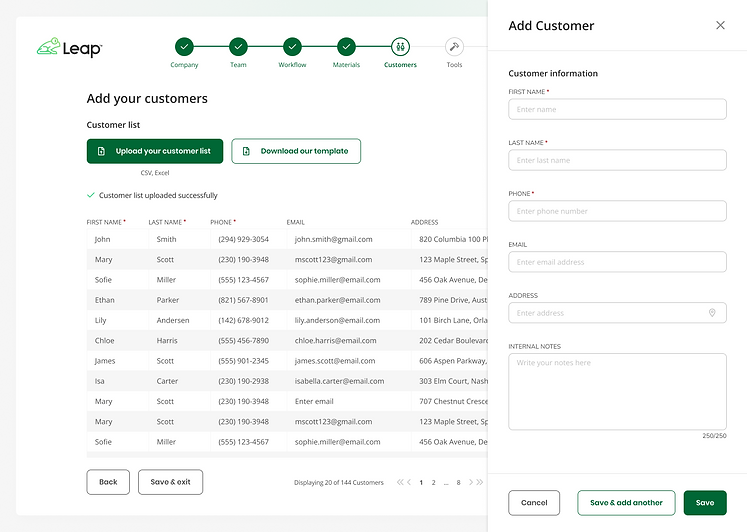
Step 5: Adding Customers
For V1 we just had the ability to add customers manually one-by-one or upload a spreadsheet with customer data. In future versions we planned to have the ability to import customers from another CRM and also add from the user's mobile contacts.



Step 6: Tool Integrations
For Team accounts (the upgraded account level) we offered a wide variety of tool integrations.


Step 7: Financials
We had a step to promote LeapPay, our in-house payment processor, with a video created by the Marketing team. The step also included other options and more integrations added later.


Financials iterations
In following phases, we added integrated lenders as a separate step within financials.


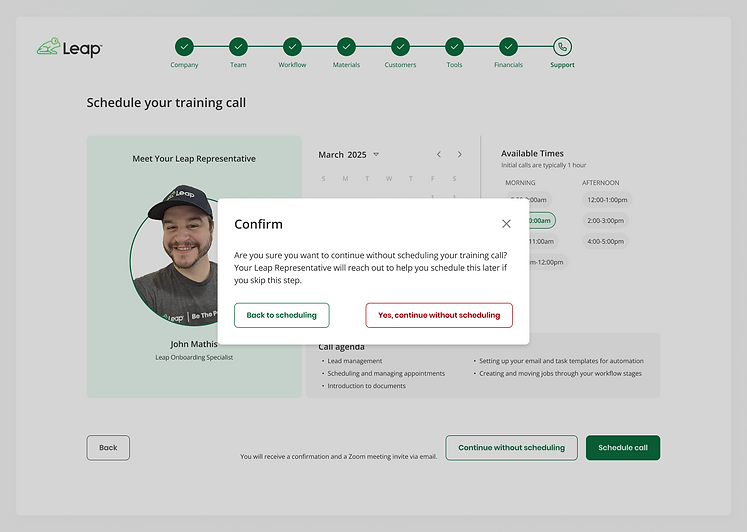
Step 8: Schedule Onboarding Call
In the final step, we allowed the user to schedule their optional onboarding training call with their assigned onboarding rep. It provided live availability and a call agenda to build value in the interaction. I even created custom headshots for everyone on the onboarding team!



Save and Exit Feature and Completion Confirmation
At any point in the onboarding process, the user could save their progress to finish later. The average time to complete onboarding was about 45-60 minutes, but a lot of users chose to complete it in increments. At the end, we also gave them a way to rate and comment on their experience.


Product-Led Growth Explorations
Although it was pushed further out, I researched, designed and shipped a flow to allow and encourage the user to upgrade their account at 4 of the 8 steps in the wizard reaching them at key decision points like adding more seats, or accessing integrations only available at the upgraded account level (Team account).


We added the ability to purchase additional licenses (seats) from here and automatically toggled on the "Interested in large team discounts" toggle when seats reached 10+. This triggered an email to the sales team to give these accounts special attention.


In the confirmation screen, we showed which sections and features were unlocked as a result of the purchase and the user could continue where they were in the process or explore the unlocked features.


Future Considerations for Post-Onboarding
In future iterations we explored post-onboarding flows like a navigable checklist and AI help for completing skipped steps or missing information.
Prototype and Dev Handoff
I provided clean and detailed handoff files including additional variations and instructions for the engineering team to make the handoff process fast and easy. Here's a screenshot of one of my Figma pages:

Results & Performance
This project was a massive undertaking with lots of challenges, roadblocks, constraints, and other complicating factors. We tracked performance regularly with a custom insights dashboard that we created with AI and we were very happy with the overall results.
-
Time to First Value (TTFV) was reduced from more than 30+ days to 14.1 days (average from 300+ accounts over 9 months)
-
Time to First Job (TTFJ) was reduced from about 16 days to 4.9 days
-
Customer training time was cut by nearly 50%
-
Saved the onboarding team 300+ hours in the first 9 months